.png?width=500&height=141&name=BRANDING%20ELEMENTS%20LIBRARY%20(11).png)
We’re excited to announce that our latest enhancement to the Transaction Assignment (Project/Grant Linkage) process is now live and available in Aclarian!
This update is designed to improve performance and usability when working with large numbers of transaction lines.
What’s New & Improved?
Improved Performance for Large Transaction Assignments
Transaction Assignment forms with a high number of line items will now load and process more efficiently.
Previously, forms containing a large number of transactions could experience slower loading and approval times. With this update, the system now retrieves and processes Project/Grant, Sub-Segment, and Task information more efficiently, significantly reducing the number of requests needed to load the form.
New Grid Experience
Transaction Assignment rows are now displayed using an enhanced grid layout, providing a more efficient way to review and manage large volumes of transactions.
The new grid includes:
- Pagination
- Quick Search
- Floating Filters
- Highlighting for rows that require attention
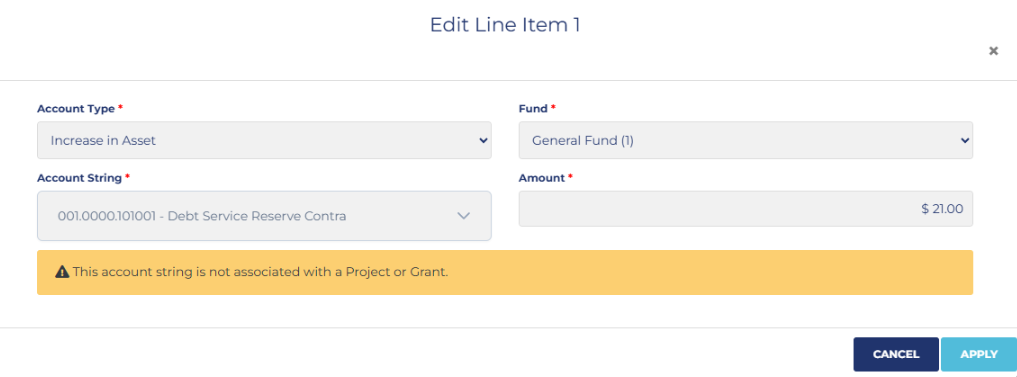
- An Edit button that opens the selected transaction in a separate editing window
Only the rows currently being viewed are actively rendered, helping the form remain responsive even when working with hundreds of transactions.
Edit Transactions Individually
Instead of loading every transaction editor at once, users can now select the Edit option for the specific transaction they need to update.
The existing Project/Grant Linkage editor will open for that individual row, allowing users to complete the same assignments as before while improving overall form performance.
Clearer Messaging for Unassigned Account Strings
When editing a transaction, if the selected account string does not have an associated Project/Grant, the row editor will now display the following message:
“This account string is not associated with a Project or Grant.”
This provides clearer guidance when a transaction line simply does not have a Project/Grant mapping available, rather than making it appear that the assignment functionality is not working correctly.
Large Transaction Confirmation
The Transaction Assignment Form continues to support large transaction volumes.
If Get Accounts returns more than 500 line items, Aclarian will now display a confirmation message before loading them.
This allows users to decide whether they would like to proceed with loading the larger set of transactions.
Forms with fewer than 500 lines will continue loading normally.
Previously saved forms will always remain accessible regardless of the number of lines they contain.
Unlink All Confirmation
The Unlink All option now includes an additional confirmation step before removing assignments.
This helps prevent users from unintentionally clearing Project/Grant Linkage information from a large number of transactions.
Faster Approval Processing
The approval process has also been optimized for larger Transaction Assignment forms.
During testing, a form containing approximately 460 transaction lines showed significant performance improvements:
- Form loading was reduced from hundreds of system requests to approximately 8 requests
- Approval processing improved from approximately 72 seconds to 13 seconds during testing
Actual performance may vary depending on the size and complexity of the form, but this update provides a much smoother experience when working with large transaction sets.
Validation Remains the Same
Although the way transactions are displayed has been improved, the existing Transaction Assignment validation and approval rules remain unchanged.
When the form is submitted:
- All transaction lines are still validated
- Rows with missing or invalid information are highlighted in the grid
- Existing save and approval behavior remains in place
Benefits
This enhancement provides:
- Faster loading for Transaction Assignment forms
- Improved responsiveness when working with hundreds of transactions
- Easier navigation through large transaction sets
- More efficient editing of individual rows
- Faster approval processing
- Clearer identification of transactions requiring attention
- Additional confirmation before loading very large transaction sets or unlinking all transactions
- Clearer messaging when an account string has no associated Project/Grant
This enhancement is now live and available for use in Aclarian.
We hope you enjoy the improved Transaction Assignment experience! If you have any questions, please don’t hesitate to reach out to Client Support, we’re here to help.
Need help?
If you have questions about this enhancement, contact the Aclarian Client Support team for assistance.
- Email: clientsupport@aclarian.com
- Contact your assigned Customer Support liaison
- For urgent issues, use the Live Chat Feature