.png?width=500&height=141&name=BRANDING%20ELEMENTS%20LIBRARY%20(11).png)
Training Video Available ▶️
Please watch the video for a complete demonstration:
Individual Payee & Individual Payment Forms
Overview
Use the Individual Payment Form to create one time check payments for non vendors.
-
This form does not require a full vendor setup.
-
It pulls payee information from the Individual Payee table.
-
If Auto Pay is enabled, the form can issue a physical check.
-
This form does not support ACH payments.
When to use this form
-
We recommend using the Individual Payment Form for non recurring customers or vendors.
-
Use this form when a one time payment is needed and a full vendor record is not required.
Before You Begin
Before creating an Individual Payment, make sure the Individual Payee has already been created. If the payee does not exist yet, create it first using the Individual Payee Form.
Required form access
- Individual Payee Form
- Individual Payment Form
If these forms are not visible, your administrator may need to update permissions.
Where to find the Individual Payee Form
To open the Individual Payee Form:
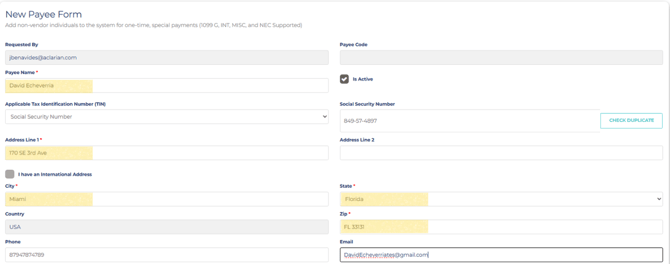
1. Go to Purchasing Module.> Forms. > Individual Payee Form.
2. Fill out the required fields:
- Payeem Name
- Applicable Tax Identification Number
- Payee Address
- Form 1099 (If applicable)
- Pay Electronically Via ACH?

Where to find the Individual Payment Form
To open the Individual Payment Form:
1. Payments Module > Select Forms > Open Individual Payment Form.
How it works
The Individual Payment Form uses information stored in the Individual Payee table.
After the payee record is available, you can create a one time payment without setting up a full vendor record.
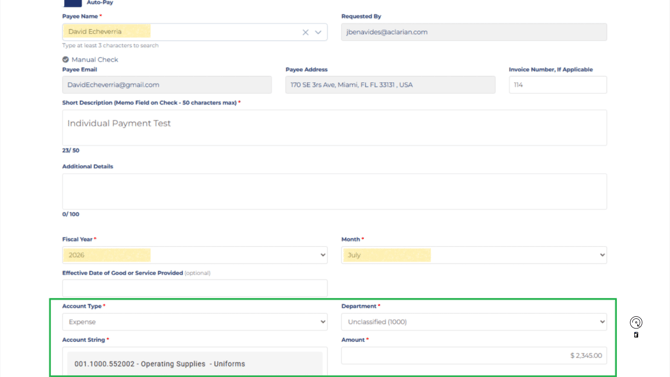
1. Fill in the required fields (marked with a red asterisk *):
- Payee Name* — Search and select the vendor from the list of active Vendors
- Invoice Date — Date shown on the vendor’s invoice.
- Invoice Number — Vendor’s invoice/reference number.
- Short Description* — Brief description of the payment (this appears on the check stub).
- Fiscal Year and Month*
- GL string and Amount*
Summary
The Individual Payment Form is intended for one time check payments to non vendors.
It helps simplify payment processing when a full vendor setup is not needed.