.png?width=500&height=141&name=BRANDING%20ELEMENTS%20LIBRARY%20(11).png)
Your vendor is trying to access the Vendor Portal to submit an invoice. They clicked Reset Password but did not receive an email. You confirmed their email address is correct in the system.
The most common reason this happens is that the vendor has not registered for the Vendor Portal yet.
Why Does This Happen?
A vendor can exist in your system without being registered as a Vendor Portal user. If they have never completed the registration process, the system has no portal account to send the reset email to.
How to Check
Follow these steps to confirm whether your vendor is registered:
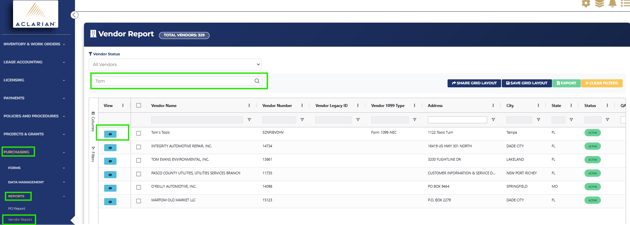
- Go to Purchasing > Reports > Vendor Report
- Search for the vendor name
- Click the View icon next to the vendor to open the Vendor Detail Report
- Scroll down to the tabs at the bottom of the page
- Click the Portal Users tab
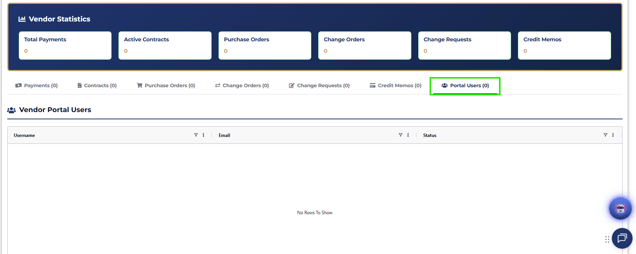
- Check whether a portal user is listed
If the Portal Users tab is empty, the vendor has not registered yet.
What to Do Next
If no portal user is listed, your vendor needs to register before they can log in or reset a password.
Here is what to do:
- Go to Purchasing > Data Management > Vendor Management
- Find the vendor's record
- Locate their Vendor Number
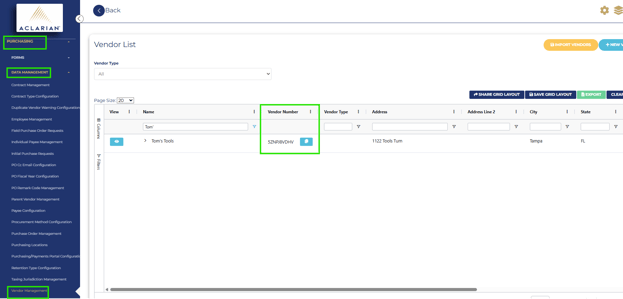
- Share the Vendor Number with your vendor
- Ask them to go to the Vendor Portal and complete the registration using that number
- Once they register, they will receive an email to set up their username and password
After registration is complete, they will be able to log in and submit invoices.
Important Notes
- A vendor existing in your system does not mean they are registered for the Vendor Portal. These are two separate steps.
- Your vendor needs their Vendor Number to complete registration. You will find this in Vendor Management.
- If your vendor is listed under Portal Users but is still not receiving emails, contact Client Support for further assistance.
Need Help
If you have questions about Vendor Portal access or registration, contact the Aclarian Client Support team for assistance.
- Email: clientsupport@aclarian.com
- Contact your assigned Customer Support liaison
- For urgent issues, use the Live Chat Feature